
Element-UI问题清单
部分内容转载自:8 号的凌晨 4 点的一份 ElementUI 问题清单
form 表单只有一个 input 时回车键刷新页面
TIP
原因:触发了表单默认的提交行为,给el-form加上@submit.native.prevent就行了。
<el-form inline @submit.native.prevent>
  <el-form-item label="订单号">
    <el-input
      v-model="query.orderNo"
      :placeholder="输入订单号查询"
      clearable
      @keyup.enter.native="enterInput"
    />
  </el-form-item>
</el-form>
动态表单 form 重置遇到的问题
TIP
相对于动态表单(有条件的对表单进行渲染)而言,需要使用v-show实现显示隐藏功能。如果使用v-if会报错,但不会影响重置结果,报错的大概内容是"‘indexOf’ is not function"。
解决表格线条不对齐
body .el-table th.gutter {
  display: table-cell !important;
}
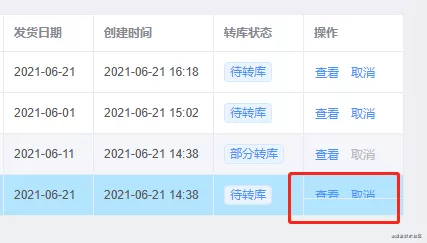
表格固定列最后一行显示不全
TIP
这种情况有时在宽度刚好处于临界值状态时会出现。因为固定列是独立于表格body动态计算高度的,出现了固定列高度小于表格高度所以造成最后一行被遮挡。
// 设置全局
.el-table__fixed-right {
  height: 100% !important;
}
气泡确认框文档里的 confirm 事件不生效
WARNING
版本:element-ui:<Badge text="2.13.2" />,vue:<Badge text="2.6.10" />
// 将confirm改为onConfirm
@onConfirm="onDeleteOrder(row.id)"
输入框用正则限制但绑定值未更新
为了做输入框的正则限制,常采用下面的方式:
<el-input
  v-model="form.retailMinOrder"
  placeholder="请输入"
  onkeyup="value=value.replace(/[^\d.]/g,'')"
/>
这样做虽然输入框的显示是正确的,但绑定的值是没有更新的,将 onkeyup 改为oninput 即可。 输入中文后 v-model 会失效问题,可以这样写:
<el-input
  v-model="form.retailMinOrder"
  placeholder="请输入"
  @keyup.native="form.retailMinOrder=form.retailMinOrder.replace(/[^\d.]/g,'')"
/>
去除 type="number"输入框聚焦时的上下箭头
/* 设置全局 */
.clear-number-input.el-input::-webkit-outer-spin-button,
.clear-number-input.el-input::-webkit-inner-spin-button {
  margin: 0;
  -webkit-appearance: none !important;
}
.clear-number-input.el-input input[type="number"]::-webkit-outer-spin-button,
.clear-number-input.el-input input[type="number"]::-webkit-inner-spin-button {
  margin: 0;
  -webkit-appearance: none !important;
}
.clear-number-input.el-input {
  -moz-appearance: textfield;
}
.clear-number-input.el-input input[type="number"] {
  -moz-appearance: textfield;
}<el-input type="number" class="clear-number-input" />只校验表单中的某一个/些字段
在一些用户注册场景中,提交整个表单前有时候我们会做一些单独字段的校验,例如发送手机验证码,发送时我们只需要校验手机号码这个字段,可以这样做:
this.$refs["form"].validateField("mobile", (valid) => {
  if (valid) {
    // 发送验证码
  }
});
需要多个字段,将参数改为数组形式即可。
移除对应表单项的校验结果
<el-form-item label="链接" prop="url" ref="refUrl" v-show="ruleForm.status==3">
  <el-input v-model="ruleForm.url" placeholder="请输入链接"></el-input>
</el-form-item>

```js changeStatus() { this.$refs.refPath.clearValidate(); }
弹窗重新打开时表单上次的校验信息未清除
<el-dialog @close="onClose">
  <el-form ref="form"></el-form>
</el-dialog>

// 弹窗关闭时重置表单 onClose() { this.$refs['form'].resetFields() }
表头与内容错位
// 全局设置
.el-table--scrollable-y .el-table__body-wrapper {
  overflow-y: overlay !important;
}
表单多级数据结构校验问题
<el-form :model="form">
  <el-form-item label="部门" prop="dept"></el-form-item>
  <el-form-item label="姓名" prop="user.name"></el-form-item>
</el-form>

rules: { 'user.name': [{ required: true, message: '姓名不能为空', trigger:
'blur' }] }
表格跨分页多选
其实根据文档,只需加上row-key和reserve-selection即可。
<el-table row-key="id">
  <el-table-column type="selection" reserve-selection></el-table-column>
</el-table>
根据条件高亮行并去除默认 hover 颜色
<el-table :row-class-name="tableRowClassName"> </el-table>

tableRowClassName({ row }) { return row.status === 2 ? 'highlight' : '' } //
设置全局 .el-table .highlight { background-color: #b6e8fe; &:hover > td {
background-color: initial !important; } td { background-color: initial
!important; } }
表单不想显示 label 但又想显示必填星号怎么办
// label给个空格即可
<el-form>
  <el-table>
    <el-table-column label="名称">
      <template>
        <el-form-item label=" ">
          <el-input placeholder="名称不能为空" />
        </el-form-item>
      </template>
    </el-table-column>
  </el-table>
</el-form>
table 内嵌 input 调用 focus 方法无效
<el-table>
  <el-table-column label="名称">
    <template>
      <el-input ref="inputRef" />
    </template>
  </el-table-column>
</el-table>

// 无效 this.$refs['inputRef'].focus() this.$refs['inputRef'][0].focus()
this.$refs['inputRef'].$el.children[0].focus() // 有效
<el-input id="inputRef" />
document.getElementById('inputRef').focus()
表格内容超出省略
<el-table-column label="名称" prop="customerName" show-overflow-tooltip>
</el-table-column>
el-tree 展开/收起所有节点
<el-tree ref="tree"></el-tree>

expandTree(expand = true) { const nodes =
this.$refs['tree'].store._getAllNodes() nodes.forEach(node => { node.expanded =
expand }) }
修改 el-input 的高度
// 方式一:无效果
>>> .el-input__inner {
  height: 37px !important;
  line-height: 37px !important;
}

// 方式二:页面报错
/deep/ .el-input__inner {
  height: 37px !important;
  line-height: 37px !important;
}

// 方式三:成功
::v-deep .el-input__inner {
  height: 37px !important;
  line-height: 37px !important;
}
手动获取 el-input 焦点
- 需求:
输入框一开始是隐藏的,点击按钮显示输入框并获取焦点。 把手动获取焦点的那段代码写在
$nextTick()中即可。首先给标签加个属性ref=“searchBox”,然后点击按钮把控制显示的字段赋值为true,接着写下这行代码就好了。
this.$nextTick(() => {
  this.$refs.searchBox.focus();
});
el-table 用 v-if 隐藏显示列和预期不符问题
给el-table-column加一个key属性,:key="Math.random()"或者其他的,确保每列的key值不同即可。
对表格中的数据做处理
在使用
el-table的时候有的时候需要对表格中的数据做处理,需要用到filter,虽然官方也有提供过滤的方法filter-method,但是还是用自定义列,然后用filter复用性好一些。
<el-table-column label="日期">
  <template slot-scope="scope">
    <span>{{scope.row.date | dateConvert}}</span>
  </template>
</el-table-column>
tabs 标签中的 name 属性
因为给name绑定了数字类型的数据,所以报错。name属性要求的是字符串类型。在使用过滤器时,需要使用v-bind:name="item.id"来实现,使用:name="item.id"无法实现。
<el-tabs v-model="indexTab">
  <!-- 注意:indexTab属性也要为字符串。 -->
  <!-- 方案一:直接在标签属性上使用.toString() -->
  <!-- :name="item.id.toString()" -->
  <!-- 方案二:使用过滤器 -->
  <el-tab-pane
    v-for="item in tabBar"
    :key="item.id"
    :label="item.title"
    v-bind:name="item.id | numToStr"
  >
    用户管理
  </el-tab-pane>
</el-tabs>filters: {
numToStr(num) {
num = num.toString();
return num;
}
}引入日期时间的时候遇到英文问题
需要在 main.js 配置这句话:
import locale from "element-ui/lib/locale/lang/zh-CN";
Vue.use(ElementUI, { locale });
表示全局配置 element 多语言组件
选择完成的日期时间结果打印
框架返回的时间是这样的:Fri Nov 10 2000 04:01:01 GMT+0800 (中国标准时间),可以通过以下方式转换成:2021-08-14 10:01:20
let Day = new Date(e[0]);
let Time = Day.getFullYear() +"-" +this.double(d.getMonth() + 1) + "-" +this.double(d.getDate()) + " " +this.double(d.getHours())+":" +this.double(d.getMinutes()) +":" +this.double(d.getSeconds());

double(num) {
if (num < 10) {
return "0" + num; //如果时分秒少于10,则在前面加字符串0
} else {
return "" + num; //否则,直接返回原有数字
}
}
隐藏的 el-scrollbar 组件
element-ui 中有个隐藏的组件官方并未给出文档,他是自带的一个自定义滚动组件,也是非常好用的~
<el-scrollbar wrap-class="" view-class="" :native="false">
  ......
</el-scrollbar>
相关文章
::: cardList 2
- name: element-ui之el-table的使用合集
  desc: ""
  bgColor: "#F0DFB1"
  textColor: "#242A38"
  link: https://segmentfault.com/a/1190000024479045
- name: Element-ui使用中遇到的问题总结
  desc: ""
  link: https://segmentfault.com/a/1190000023256421
  bgColor: "#DFEEE7"
  textColor: "#2A3344"
:::
评论
填写昵称和邮箱即可留言,无需登录。